Windows 98 Plus! Themes For Windows 7
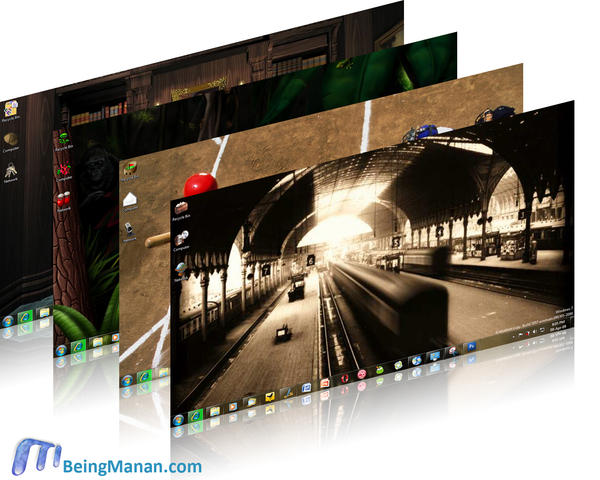
After making your Vista into Windows 7 & XP into Vista, I had a little moment of nostalgia when I decided to install Windows 98 on Windows 7 via Virtual PC. It wasn’t exactly as easy as I thought, creating a bootable CD of Windows 98 on Windows 7 on a machine with no floppy drive was pretty geeky. Anyhoo … I got it done & listening to the welcome sound of Windows 98 brought back old memories, rebooting after installing every driver reminded me of what all we used to do back in the days. Life’s much simple now, Vista made it so, Windows 7 takes it further, which brings me to themes in Windows 7. After a long time Microsoft allows us to package Sounds, Icons, Wallpapers & Colors with ease & share them around. So I thought why not bring back those good ‘ol themes of Windows 98 on 7. Here are 4 ready made packages & resources for all 16 themes that were bundled with Windows 98.
The themes contain:
- Wallpaper
- Mouse pointers
- Desktop icons
- Sounds
- Color scheme
To install just double click on the file. The 4 packaged themes:
 |
 |
 |
 |
Click on the theme to download.
Download resources for all 16 themes:

Mirror links: , Jungle, Mystery, Travel
UPDATE: Free beer for Madata© for creating install packages for the rest of the themes!
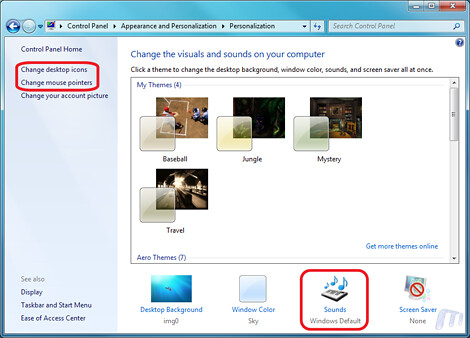
If however you find that the cursors or the sound scheme is too noobish then you can choose the default schemes from the respective control panels:
Control Panel –> Appearance and Personalization –> Personalization will bring this screen:
| For Cursor: | For Sound: |
| Select Change mouse pointers from the left sidebar & select the Windows Aero (system scheme) | Select Sounds from the bottom options & select the Windows Default scheme. |
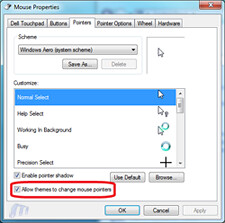 |
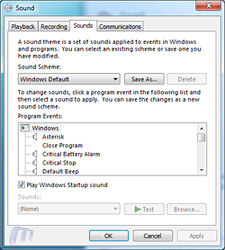 |
To change the icons:
Select Change desktop icons from the left sidebar:
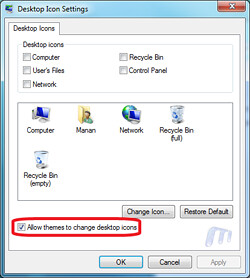
NOTE: You can also disable the themes changing your Icons & Cursors by un-checking the “Allow themes to change …” in both windows as highlighted.
Update: TimTusk has been kind enough to extract the Screensavers and they are available for download. To use them you need to copy the files to:
- C:\Windows\System32 in case you’re using 32- bit Windows.
- C:\Windows\SysWOW64 – in case you have a 64-bit Windows installation.

Mirror by DZ
~Enjoy

So, thats why you installed Win98? cool.. great effort :D
The most memorable part of installing Win98 (bazillion times) back in the days was looking at that first bootup screen which says “Ready to start windows 98 for the first time” and loling…
Man.. its was so silly, to lol at that.. but oh well, we were little kids sitting and spoiling computers :P
@Reetesh sort of yes, wanted to go back in time :)
nice effort man.. i was jus searching the web for windows 98 wallpapers… as i loved them !! Stumbled upon this web page and just admired ur efforts. Nice to know ppl still like win 98 wallpapers (i know becasue of old memories associated with them). But .. those were daysss man !!! :-) Gud work buddy… cheers !!
Thank you :)
Thanks for the walk down memory lane.
Brings back a lot of memories.
:up:
Nice tut.. brings back memories of late 90s :D
Gr8.. Will give it a try for sure..
Thanks..
oohhh Windows 98.. brings back fond.. and not so fond memories .. especially “Getting ready to Start Windows 98 for first time”, only to note it only starts the setup :-/
Oh well, Plus pack FTW! Nostalgia FTW! Thanks dude! :D
Ah! :D But the wallpapers does’nt support widescreen. :(
Yes, but Windows’ wallpaper resizing algo does a decent job. Set it from Control Panel :)
Any chances to do this for Vista? Or better, is it working for Vista too?
Thanks. ;-)
No, the pack won’t work on Vista. And if I do get time I might do it, a bit busy these days. :)
Do the theme packs work on XP?
Unfortunately no.
how do you use the other themes,there are ne theme files with them
FOr the other themes I have bundled all the resources ie. the cursors, wallpapers & sounds … so you’ll have to manually edit all of that stuff from within the respective panels … refer screen shots. :)
Shame that you have not gone the extra step to create them as windows 7 themes. So that all you need to do is install and go
For those for do not feel like manually completely the rest of the themes, i have completed them and uploaded them online. Credit remains to Manan for the great idea
http://bit.ly/3XuvF4
Thanks a million Madata. Great woork – Michael from Sydney Australia.
Awesome! Thanks a ton for that. Post updated. Amazing job dude!
this is so amazing. i’m not good with nostalgia, i might cry :D
thanks dudes
Your welcome anything to help a good cause :)
:) Further update Windows Xp Plus Themes for Windows 7
http://bit.ly/1BnFPb
Sweet stuff! Much appreciated :)
Great themes package. Any change you have some of the Plus! themes? There was a great green germ that I have since lost. Good Job.
Thanks,
Flashback,, YaY for Win7 ColorView Features!
Hey Manan :) Greetings from Germany, veery nice job :-)
lot of memories …
so i use vista … can you tell me pls, where i can get the “travel theme” background? Just the background wallpaper, nothing else … would be a dream for me :)
cheers,
daniel
The zipped package that has all the resources (download link above) contains sounds & wallpapers of all 16 themes. You’ll find the wallpaper in the Travel folder. :) Cheers!
There is a Jazz theme … it woul be great if you could put at least the wallpaper.
@Carlo yea I had an interesting trip down memory lane too. :)
@Supirole: all the default Plus! theme resources are bundled in the pack. :)
I loved the “Jungle” theme in Windows 98 Plus! What a throw-back.
It brought back college memories dude, thanks for the effort.
Primeras imagenes de un futuro Windows realizado por un usuario, evolucion del windows7
principal caracteristica, ya no hay una barra de tareas completa, si no iconos digamos sobre una barra de tareas invisible
http://www.youtube.com/watch?v=h7WzCI_yxBw
I like windows 98, but I can’t find the driver from the hardware provider’ webside…
can someone please tell me how to get these windows 98 themes converted to windows xp?????please….
ohh my got!
i like win 98.thank u for share
Dude I love these! Reminds me of my old bedroom at my dad’s…Got my first computer when I was eight….I switched between these themes about every day, it probably drove dad crazy. Thank you so much for taking the time to do this! I just re-aquired my first computer from someone I gave it to awhile back…now I’m looking for an old copy of ’98 on ebay to restore it to original condition…
@Fatih & Josh I agree with! It’s an awesome feeling to go in time & remember those days :)
Manan, I just found your site and noticed someone asked about the 98 themes in Vista. I still have the 98 Plus Pack and it works fine in Vista.
I’m thrilled that I’ll be able to continue using my favorite Mystery Desktop in Windows 7 when it arrives in October. Thank you for all your hard work.
Found the screensavers for most of these (with the exception of the 60’s one). Also threw in the old OpenGL ones too (Pipes, flower box, 3d text etc)
Enjoy
http://www.filedropper.com/w98plusscreensavers
awesome themes. Great wanna apply right now.
Hey, cool. Thanks for this. I just found this place looking for themes for Win7.
One question though…where is the Science Fiction theme for Plus!98? I loved that thing. Wish I still had it.
Do you happen to have it, or know where I could possibly get it? Thanks in advance!
The wallpaper, icons & sounds of the science theme are available for download, use them and u can compile the theme :)
Not the “Science” theme. The “Science Fiction” theme. Thanks though.
I’ll look around if I can find anything.
He means the “Space” theme.
That one is available in the zip file by Matadata. :)
No, I mean the “Science Fiction” theme. I have it now on a VMWare Fusion Win98 install on my Mac. Im zipping up the various parts of it now. I’ll send it to you when I’m done.
Don’t know if you will ever see this post since it’s over a year old, but I have the original installers for science fiction, falling leaves and fashion. I originally downloaded them back in 1998. If you happen to see this or anybody else for that matter, send me an email to [email protected]
Check your mail. :)
Works for Windows 8.1 also, great job!
Hey, I took the liberty of copying the .dll’s and screensavers needed from my old Windows 98 box… tested them in 7 64-bit and they work great! All you do is put them into your SYSTEM32 or SYSWOW64 folder.
http://uploading.com/files/5ab3cm85/Win98SS.rar/
@TimTusk thank you! Will update the post once I’m back home. :)
Any chance you can add the “Organic Art/SCIFI” screensaver to the list? I loved it and would kill to see it ported over to win7 64bit!
Win 98 themes do work under XP/Vista/7
This guy may not have created an installer for them, but my fav ones were the jungle theme & mystery.
They are easy to make work in XP using the theme manager that win 98 shipped with.
I also have cool XP themes including media center style, etc, that later on, I intend on making a single installer pack for.
Thank you for the present themes – good work! I was trying to install tiberian sun theme but I can’t get it to install as win7 does not recognise it. If you ever manage to get that up and running I’d much appreciate it:)
thnx.
I finally have win7 now and will FINALLY try it out and OMG, what is this man, 100 comments? :O This is crazy, also..
Hundredth!
Woot, both First and Hundredth :P
haha that’s trackbacks+comments. :) But, yeah funny you’re the first & 100th!
Hi!
I love Windows 98 theme very much. So, your stuffs is so interesting. But, it’s not include screensavers. Can you do it for sceensaver too?
Thanks!!!
Quick question. I have a mac os x, and I use vmware fusion 3 to run windows at the same time. With windows 98, will Microsoft plus 98 work inside windows 98 on the virtual machine?
it will. But why would you want to install Windows 98 on a Mac? Anything specific?
yo necesito instalar temas de windows 98 en el sistema operativo windows XP. DIME COMO PUEDO HACERLO
I love to run the classic windows operating systems, and my mac system. There’s a couple of games that I have that won’t work with the later systems, and plus, I love to see the development of the windows. I have a bootcamp partition, which I run Windows 7 professional. I then have vmware fusion, which I use to run earlier Windows, also because of some programs that won’t work. Plus, 98, and windows 7 are my favorite windows systems. I love being able to run both mac and windows. I grew up with both, so this is a great way for me to have both.
ah! Hard disc constraints is why I haven’t done something like this. A couple of years back I had setup a quad-boot with Linux Ubuntu, Windows XP, Vista & OS X (hackintosh) on my PC. Was great fun, Virtualization wasn’t an option due to hardware specs of my PC. I do have ready to boot VHDs of quite a few OSs though. Good fun to play around on them! :)
Got a new computer with Windows7..years ago I bouth Microsoft Plus! for WindowsXP but did not have enough oomph to run it….will it work on 7 if I install the cd?
Thanks for your help!
I doubt it but you can try it out in the Compatibility mode.
Man u ROCKKKKKKKKKKKK
awesome stuff
brings back so many memories
*nostalgic
THANX
holas
Great work!! Cool.
Manan, you never put my screensavers in the article
aww damn! Just did! Sorry… completely skipped my mind!
Any chance you can add the “Organic Art/SCIFI” screensaver to the list? I
loved it and would kill to see it ported over to win7 64bit!
Woah that totally roxx :D So nostalgic :)
:-) Thanks
Thanks! Btw, how have you done this – it would be nice if you could “port” the “Windows 98 Classic” theme to Windows 7. In Windows 7 there is only “Windows 2000” color thereme… How bad!
Do you happen to just have the wallpapers? I really just want the Mystery wallpaper. thank you so much for the theme!
Here you go – http://yfrog.com/j8mysterywallpaperj
Did you ever get my email about the Win98 SciFi theme I wrote to you about above?
Sir I have been looking for the sci fic for so long, If you could be so kind may I have it also. [email protected] Bob Williams
You are a champion! This brings back so many memories.
I really have to thank you, this bring me back old memories :)
Very nice, but I can’t get the 60’s screen saver to work right. I’ve got it set up for spiral, size 500, speed 1 and twist 1. Both “Flip Background” and “Use Wallpaper” are unchecked. when running the preview it works as expected. But when it kicks in by itself it seems to ignore my settings and runs super fast and the size is much smaller. Also, my background disappears and it leaves me with a white screen. Using a .jpg as my background.
so does someone have the files for the win98 SCI-FI desktop theme? In particular I really would like the SCI-FI screensaver – I have the rest of the stuff.
year old thread but I’m a hopeing!!!
See? Im not the only one looking for the SciFi theme. Im not crazy like I was told. Its NOT the Science theme.
Anyone have the screensaver or the theme? I still can’t find it after all this time. If I knew how to repackage it I would, but I dont. I sent all the files from the theme to manan months ago but he never responded. Im guessing hes ignoring me now – I told him there was a Sci-Fi theme but he just keeps telling em I mean Science.
i’ll give it a hot. will install win 98 on a vm again.
I have the files for the theme but Im not sure how to make a theme. Manan isnt listening to me anymore. I sent him the files over a year ago.
hahah! Sorry dude, it shall happen this weekend. But if anyone wants to make the theme, the files are linked above to download.
how to install themes compressed package?
Oh, the memories. Sound included! Very fun. Thanks. You are a cool guy!
Can someone help me to download the Win98 themes package for Win Xp? I am not so lucky to have Win 7 just yet. But, would really like it for Win Xp.
try to extract the content using 7-zip http://www.7-zip.org/, once you have done this, just change the cursors, sounds and wallpapers on winxp (sorry but i don’t know how to make a theme on winxp, i’ll try on a VM)
Thank you! It’s been so long i dont see those themes, and i just installed them back on my W7 laptop, and they brought me very good memories from those times.
First, thanks to all that made this possible- I downloaded the zip file and put the individual files with the other themes- 7 doesn’t recognize them so I’m doing something wrong! Any help available?
try this link to get the rest of themes. http://cid-7a9d87fa129538ef.office.live.com/self.aspx/Public/XP%20Plus!%20Themes.rar
Do you have to install the dll on the screensavers? I installed the screensaver , but they do not show up in the screensaver window.
Back to the old days.
Thanks man.
Regards,
Paul
how do u make the windows 98 Theme into an installer package or theme file for windows 7
Did you remove some of the packages? I rememebr there being all the themes being packaged but in that zip file there are only 4 themes.. and not even Windows 98 plus themes
Found it.. in the comments. Thought it was in the original post but maybe not
the travel one was my favorite.. but the Da Vinci was kool too. Underwater one amazing. they were better when i got my laptop that had Windows XP Media Center Edition 2005. oh my goodness that was TRULY AWESOME! but..my computer had some problems then..we couldn’t find it to reinstall it :”cc wah. anyone remember the Da Vinci one, the underwater sea theme, … -__- forgot the other one..
Awsome- you rock man.
Wait, but these don’t even look like windows 98…..
Why doesn’t the ss file include organic art?
I just posted a request looking for Organic Art, hopefully someone sees it and uploads it one day.
Thank you very much, I was looking since started windows xp, but now I got this.
I am very happy to have this and being with windows98.
Thank you so much once again.
Thank you very much, I was looking since started windows xp, but now I got this.
I am very happy to have this and being with windows98.
Thank you so much once again.
Thank you so much for your hard work. Cannot find the “Jazz” theme. Thanks.
Hi I liked Jungle in the past so downloaded it for W7 in July. However, I am unable to get rid of it even using another theme. I cannot find it in my programmes in Control panel to uninstall. How do I uninstall this theme please
Sue – UK
It’s pretty simple to uninstall.
Control Panel -> Appearance and Personalization -> Change the theme From here choose any of the available themes or change whatever you wish to. :)
I’m wondering if you’ll be doing anything with the Bonus Plus! Pack for the Garfield, Peanuts, Monsters and etc… I loved this one with the animated backgrounds :)
i just want the start menu back from 98. in xp i used to put the start menu in classic mode but even that wasnt the same, in 7 i havent even bothered (i just run a debian VM at work and debian at home)
Thanks for posting these! I’m recalling finally having a real job and being able to buy a heavy duty machine with the amazing new Windows 98. (which crashed on me three times a day)
Next thing – Win 95 themes (?) for Win7! May be DOS look for Win7 too.
Abhijit,
I would love it if Windows 7 wallpaper came up with a black screen and a flashing C:/ prompt in clasic green! Also all of the windows sounds were simple internal speaker beeps. The mouse pointer could simply be a green flashing underline. I would not use it long, but darn it would be cool. Insted of icons we could have all the desktop icons appear as green text as if you typed in dir.
Thanks so much for posting these! Would you be posting the Space and Underwater themes as well? Much appreciated!
Oops nevermind, just saw the other link!
I got bored yesterday and pulled an old box of mine out of mothballs “Intel 866MHz” Stuck a gig of RAM in her “Only see’s 890MB” O well. Don’t feel like flashing the bios. Put my old ATI All-In-Wonder X800 Video card in. Finally found my old copy of Windows 98se and went to work. Man I felt like a man in the time machine. And Ya! I was giggling!! Even after all the restarts and tracking down drivers. Hours and hours later, I got it done. I can’t believe how fast the box is and how miniscule the install is. After the 98se install and a few programs “584MB” What are we at with Win7, 12GB after install? Crazy!! I think I’ll leave the door on the time machine closed for a while and enjoy the past.
Thank you Manan for the themes.
You’re most welcome :)
Thought I would share some Win98 themes I converted for Win 7
http://dl.dropbox.com/u/32727714/16_Win98%20Plus%20Themes%20for%20Win7.zip
Enjoy ;o)
OOPS, listed the wrong link.
Here’s the correct link to those Win98 themes.
http://dl.dropbox.com/u/32727714/16%20Windows%2098%20Plus%20Themes%20for%20Win7%20ClassicStyle.zip
Enjoy :o)
thanx thanx for d memory of high school … hikx hikx :0
Where can I find the screen saver for mystery? Does it exist for windows 7?
http://yfrog.com/j8mysterywallpaperj
Oops, sorry, that’s for the wallpaper. My bad.
Absolutely awesome.. i was just looking for the ounds (i got quite melancholic myself) and look what you brought!!!! excellent excellent excellent!
I have been looking for it a long time and It finally come, thanks a lot, using basic thmes are really helps.
Up :-)
Nyc Dude
Thanks a lot! I just got a new laptop with Windows 7 but I love my Mystery wallpaper.
Fuck yea !
I’m not particularly tech-savvy. Is there a way I can get the Jungle wallpaper – not the whole theme, just the wallpaper – for an XP work computer? I used to have it, but it was lost as part of a computer refresh.
LOL – there are cool guys, and there there was you! Thanks for sharing this and taking me back lol. I reminds me that coolness knows no date. Microsoft very obviously forgot how to be creative in a cool sort of way. I remember how nice it was to boot into win98 back in the day i knew NOTHING about computers. I’m a freakin sysadmin now LOL, but this? Deserves major kudos, Thanks guys…
What happened to the rest of the themes? You used to have more, like the Da Vinci one.. now they’re all gone. I can’t find them for the life of me either.
Nevermind. Haha
For those who want Windows 95 and 3.11 back!
It’s not that complicated:
install WinImage
install VMware 5
install DOS 6.2 twice inside it
install Windows 3.11 and 95 over DOS 6.2
if you have a laptop, create a virtual floppy disk inside 3.11 and 95; and make them accessible inside the VM (use only A:, not B:)
save some files you want, like .ICO, .CUR, .BMP, .WAV (the floppy has 1,44 MB)
open the virtual floppy disk outside the VM, with WinImage
extract the files from the virtual floppy
save them into your Windows version (“outside” the VM)
and voilà
I have Windows XP wallpaper, Windows 98 icons and Windows 95 screensavers, all in my Windows 7! It’s great!
Hi there — I just downloaded your Win98 plus theme pack for Win7 for a nostalgia hit — thanks! FYI, it seems to work well in Windows 8, too. I was wondering if you knew where I could find the Cityscape theme, though. I could have sworn that was part of Win98 Plus. If not, now worries. Just thought I’d ask. Thanks again!
i love to use it.
Hi. What should I do to run the screensavers only, NO THEMES! I like Mystery but I seem that Win98SS.rar was deleted. Where can I get it?
Thanks
do you have the screen savers for windows 98
Sound incompleto… restoure , MenuPopup, RestoreDown, Restoreup… check!
link erro screensave edivan.baptista2gmail.com (Brasil, são Paulo) thank you
I love the jungle theme! You made my day with this. Would be amazing to get the 60s theme again for Windows 7.
Links for screensavers are gone :( anyone?
I don’t blame you! I remeber those themes from my childhood! Thanks a bunch for uploading them!
Have you the Space feature” loved it Manan
Thanks for this! I LOVED the Mystery theme on Windows 98, it was one of my absolute favorites.
Cool !!, thanks for the big detail !
Hi there. I’m looking for the falling leaves theme. Is that included in this collection? I got one cursor left from my lost Plus CD with the name fl_01nor.cur. I’d like to have all of them. They used to be my favorites. I would really apreciate any help to get the cursors!
The themes work in Win 10!!!. Well, the jungle, mystery, baseball and travel themes.
Do you presently have a link to download the 98 Jungle screensaver? B.Walker
The Tim Tusk link for screensavers is no longer available. Any new info?
Esto es lo mejor!!!…. esos temas de jungla y el misterio!… ya instalados en w10…. muchas gracias por el aporte; saludos!
do these work for windows 10?
Does the travel theme cause problems with windows 10?