5 n00b Softwares To Make You Look Pro
Celebrating more than 50 posts.
There are some things which when you know how to do make your rep go up. There are many ways to get something done, but the simpler, easier & quicker way is what one should find. This is a personal list of softwares that are really handy & do their job quiet effectively.
Now these are softwares for anyone with little knowledge of computers. These softwares will help you in:
- Create personalized Windows installation disks.
- Improving your digital camera images & arrange your picture library.
- Re-size images within a few clicks for transferring and or uploading to sites like Facebook & Orkut.
- Take sexy screen shots.
- Organize your mp3s by quickly adding id3 tags & embedding Album Art in them.
1. Create Personalized, Automated, Bootable Windows Installation Disks:


Most of us need to install Windows more than once on our PCs, courtesy our own carelessness of letting it get infected by whatever means. A lot of times we need to recover or repair our installations of Windows & the only way to do that is using a bootable media, surprisingly we don’t have a bootable version of Windows on our hands. What do we do? Call up a friend and search for a bootable version, get one use it. Give it away or at most make a copy and keep it.
What if we could have our own personalized Bootable Windows Installation disc, don’t need to feed in our name for the username, no need to enter the CD key during install, disable the certain components we don’t want. Well all this can be done using a super tool called nLite for Windows XP & vlite for Windows Vista.
Here is a guide for making a personalized Windows XP disc using nlite: Click Here

1 can slip stream Service Packs, drivers, updates, make un-attended installations, feed in your network details, all sorts of things that will certainly make you look cool & geeky. I would also suggest you to go through this guide on slip streaming SPs by my friend Vishal Gupta.
There is a separate version for Vista though, it is called vlite. The main features of this as stated on the website:
- hotfix, language pack and driver integration.
- component removal.
- unattended setup.
- tweaks.
- split/merge Vista installation CDs.
- create ISO and burn bootable CD/DVD.
NOTE: All these are features of nlite as well.
2. Improving Digital Camera Images:

There are many softwares that help you arrange your photographs, Windows itself is bundled with a rather powerful Gallery. I however use and prefer Picasa, it is a very powerful software. The reason why I prefer Picasa because of the quick fire tools that it has for improving images.
A lot of times images clicked are not straight, Picasa has this super utility that gives a grid view & allows you to straighten your image. Then there are various other editing features such as Black & White, Sepia, Grain, Old Film etc. Here is a screen shot fo the options available:

Click for bigger image.
There is no specific setting to improve the image, you can play & fiddle around with the sliders. Another really cool feature of Picasa is the Collage feature. This makes a collage of the selected album based on the type of collage. Screen shot:

3. Re-size Images Within a Few Clicks:
I spoke about this utility in my Blog Images Professionally thread, here again I will bring this application becasue a lot of use Social Networking sites like Facebook, Orkut, hi5 etc. We upload our images on these sites which usually takes a lot of time, reason being the size of the images. THese services then re-size the images too, not showing the original resoultion images. A better way of doing things in this regards would be to re-size your images, which reduce the image size in terms of KBs and result in quicker uploads.

You can choose the size of the image from the pre-defined list under profiles or you can define any 1 parameter (height or width) according to your blog style and select the Keep Aspect Ratio option and it will re-size the image accordingly.
The option for format & quality can be used as required.
4. Take Sexy Screen Shots:
Want to take screen shots like this one:


This little utility lets you add borders & frames to make them look slick. From transparent windows, to film role to old paper styled templates to make your screen shot look smoking hot.
 Here is a guide to use RumShot: Click Here.
Download the default theme pack for Rum Shot: Click Here.
5. Embed Album Art & Edit id3 Tags of mp3s:

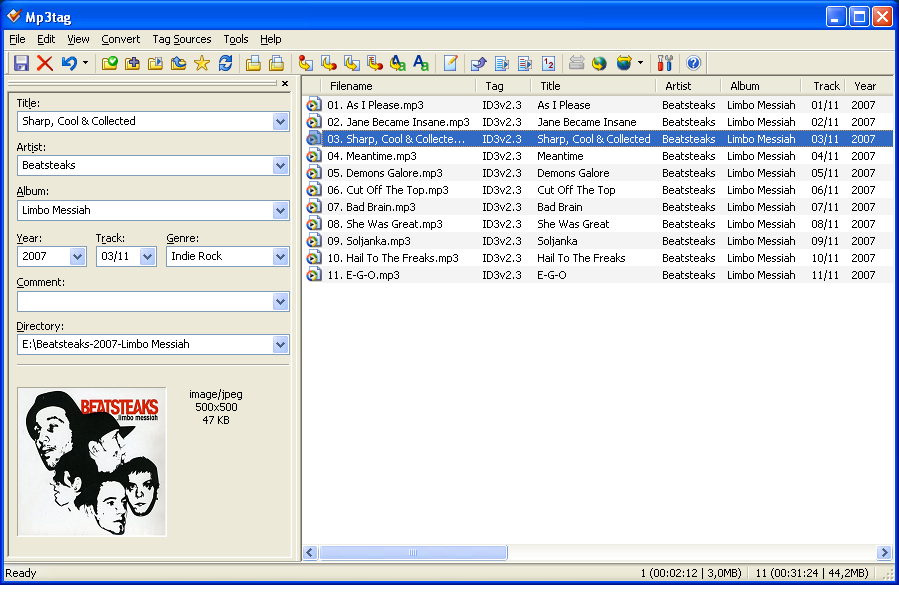
We like listening to music, we have huge collections of music, but the id3 tags are totally messed up; no Album Art. Album Art is something really fun to have. It’s hip. Commonly, softwares such as iTunes & Winamp download and store a hidden image file which is thne loaded as the Album Art, which means that if you change the location of the song, the Album Art is lost. Not to mention the messed up tags itself. This software helps in maintaining tags and at the same time it embeds the Album Art in the meta info of the song, which means that even if you change the lcoation of the file, the Album Art will not be lost.
I talked about this in my iPod Power User Guide also.
Apart form Album Art, this software lets you edit tag info of multiple files at once as a result you can edit the Album & Artist info of files of the same album at once. Screen shot:
Happy Computing :)

I use different softwares for image resizing and screenshot taking though.
and ImageBadger (which I got from freegivawayoftheday)
is very very good, it has batch converting and all too!
does that software you mentioned have batch conversions?
Nice post!
And congrats for your 50th post! :D
@Reetesh: VSO has batch conversions. :)
@Giga: Thanks
I love that ScreenShot thinggie. Thanks mate! Should be useful.
Hi,
I clicked on angryindian#2 in another blog and it brought me here. Nice blog you have here dude. I will likely be a regular visitor :)
Sudarshan.
Hey Sudarshan, nice to see you here too (I am the Angry Indian #2, not affiliated with that site in any manner other than a visitor) :) Thank you for the sweet comments :D
NIce article. Out of these I have used nLite and Runshot. I know Runshot is somewhere on my hard disk. I used to use it to show of my desktop screenshots in thinkdigit threads. May be I should also use it for my blog screenshots.
I actually think its better to use IrfanView for image resizing. Its more functional without being complicated and yet manages to appear more geeky than the image resizing soft you reccomended.
awesome man ! simply amazing to see the great noob tools and what poweruse they can give !
thanks for the great compilation and sequence :)
Wow. Thanks for this great article.
@Pallb, Shantanu & Sharon – thank you for the appreciation.
@Pallab, true 1 can use Irfan View too.